
Every centimeter the head drifts forward from neutral alignment adds roughly 10 pounds of gravitational force on the neck muscles. Home office workers staring at improperly positioned monitors accumulate hours of this strain daily, and a 2024 PMC study confirmed that standing desk users showed measurably improved craniovertebral angles compared to seated workers [1]. The Desky Dual Hardwood Sit Stand Desk ranked #1 among seven desks tested for neck pain relief, delivering the height precision, 309 lb monitor arm stability, and Siri-controlled adjustments that keep screens at exact eye level throughout the workday.
Neck pain from desk work is not just soreness. Forward head posture increases compressive force on cervical joints, fatigues the levator scapulae and upper trapezius muscles, and triggers headaches that derail productivity [2]. A height adjustable standing desk corrects this by enabling frequent posture resets that relieve cervical loading. These seven desks were ranked on height precision, motor smoothness, capacity for monitor arms, and features supporting neck-safe positioning.
7 Standing Desks for Neck Pain Relief in 2026
1. Desky Dual Hardwood Sit Stand Desk – Best for Correcting Forward Head Posture and Cervical Strain
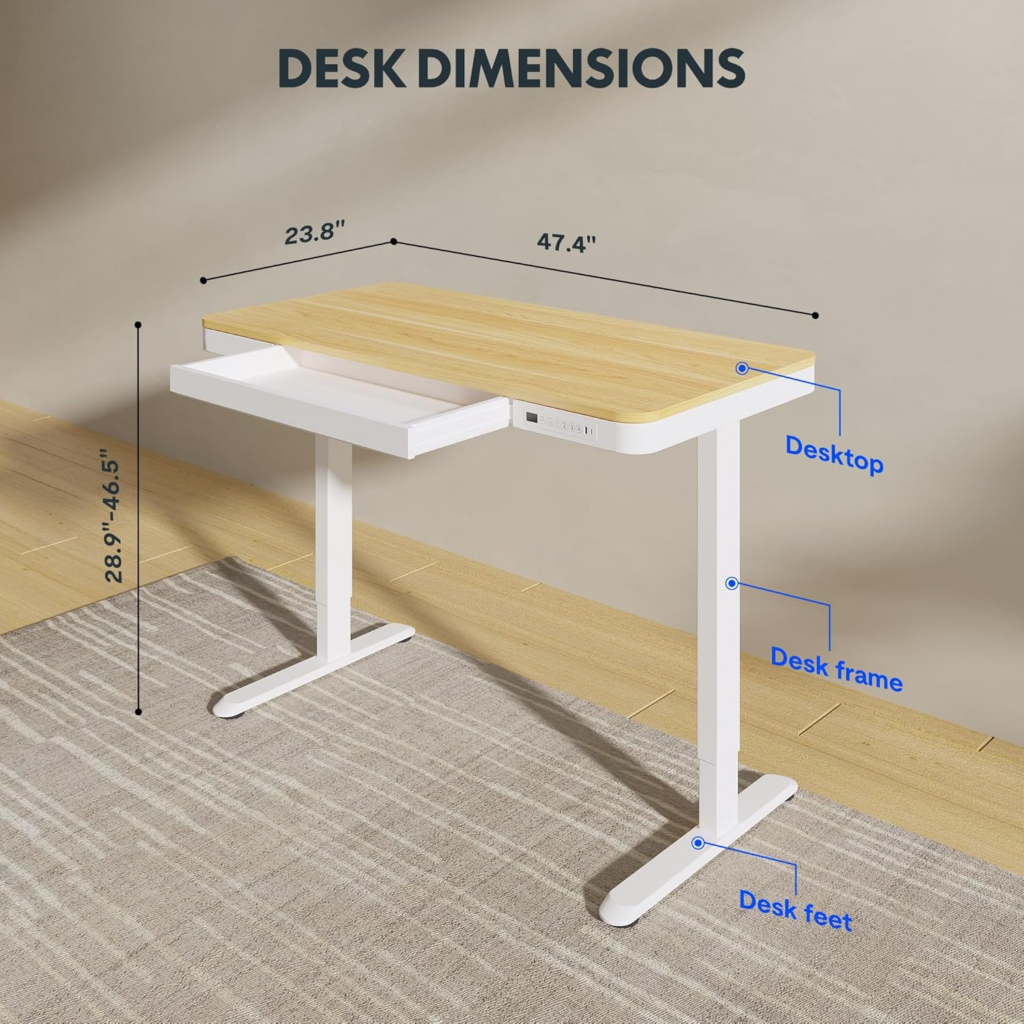
Desky Dual Hardwood Sit Stand Desk positions monitors at proper eye level across its full 23.6 to 49.2 inch range, directly targeting the forward head posture that drives most desk-related neck pain. The 309 lb capacity supports heavy monitor arms without wobble, keeping screens stable at the precise height where the craniovertebral angle stays neutral.
Siri voice control adjusts height without requiring users to look down at a keypad, which itself causes momentary neck flexion. Automated sit-stand reminders prompt regular position resets that interrupt the static cervical loading pattern responsible for stiffness and pain.
Find the right monitor-friendly standing desk at Desky for neck pain relief.
Client Review:
“The height range is perfect for keeping my monitor at eye level whether sitting or standing. My neck stiffness has improved noticeably.” – Patricia K., Amazon Review
Certifications & Awards:
* BIFMA Certified * TUV Rheinland Certified * EESS Certified * Sustainably Certified * 10-Year Warranty
Pros:
* 23.6 to 49.2 inch range positions monitors at proper eye level for neutral neck alignment
* 309 lb capacity supports heavy monitor arms without wobble or drift
* Siri voice control eliminates looking down at controls during adjustments
Cons:
* Hardwood desktops cost more than laminate options
* Monitor arms sold separately
Best for: Home office workers with chronic neck pain needing precise height control and heavy monitor arm support for cervical alignment.
Address: 500 Red Stag Way, Sweetwater, Tennessee, USA
Google Maps:
Contact:
Phone: +1 800 696 9017 | Email: help@desky.com
Facebook: Desky on Facebook | Instagram: @deskyau
2. OdinLake S2 – Silent Height Shifts for Neck Resets
OdinLake operates at ~38 dB, making mid-task neck-relief height changes virtually unnoticeable. Dual motors handle 176 lbs across 27.5 to 46.5 inches with four presets.
Pros:
* ~38 dB makes changes undetectable
* Four presets store neck-optimized heights
* Dual motors for smooth transitions
Cons:
* 176 lb limits heavier monitor arms
* Fewer finish options
Best for: Neck pain sufferers needing frequent, silent posture resets.
3. Fezibo Electric Standing Desk – Budget Neck Relief Entry
Fezibo provides four presets across 27.5 to 46.9 inches at sub-$300. The 176 lb capacity supports a single monitor arm. Cable hooks keep the workspace organized for proper monitor positioning.
Pros:
* Sub-$300 for accessible neck relief
* Four presets for neck-safe heights
* Multiple desktop sizes
Cons:
* Single motor wobbles under heavier arms
* 176 lb restricts dual-arm setups
Best for: Budget neck pain sufferers needing basic sit-stand with a single monitor arm.
4. ApexDesk Elite 60″ – Heavy Monitor Arm Platform
ApexDesk handles 225 lbs on dual motors, supporting heavy dual monitor arms for proper screen positioning. The 60-inch surface provides clearance for proper viewing distance, reducing forward lean.
Pros:
* 225 lb handles heavy dual arms
* 60-inch for proper viewing distance
* Dual motors
Cons:
* Large footprint
* No smart features
Best for: Neck pain workers running dual monitors needing heavy-duty arm support.
5. Fully Jarvis Standing Desk – Widest Range for Extreme Heights
Fully Jarvis adjusts from 22.5 to 48 inches with 350 lb capacity for users at height extremes struggling to find proper eye level with standard desks.
Pros:
* 22.5 to 48 inch range
* 350 lb capacity
* Ecosystem accessories
Cons:
* Premium pricing
* Cable management extra
Best for: Very tall or short neck pain sufferers needing extreme adjustability.
6. Autonomous SmartDesk Pro – DTC Solid Monitor Capacity
Autonomous provides 300 lb dual-motor capacity at competitive pricing. Four presets across 26.2 to 44.1 inches handle monitor arms well.
Pros:
* 300 lb for heavy monitor setups
* Competitive pricing
* Four presets
Cons:
* Narrower range
* No cable management
Best for: Average-height neck pain workers wanting solid monitor capacity at DTC pricing.
7. Seville Classics Airlift – Compact Clean Setup
Seville Classics uses a tempered glass surface with dual motors and drawer. The 132 lb capacity supports lighter monitors. Clean surface reduces clutter causing reach and twist.
Pros:
* Clean glass surface
* Drawer for accessories
* ~45 dB motors
Cons:
* 132 lb limits heavier arms
* Glass may reflect glare
Best for: Neck pain workers with lighter single-monitor setups wanting a clean desktop.
7 Standing Desks for Neck Pain Compared
| # | Brand | Best For (Neck Pain) | Height Range | Wt. Cap. | Monitor Arm Ready |
| 1 | Desky | Full neck alignment | 23.6-49.2″ | 309 lbs | Yes |
| 2 | OdinLake | Silent shifts | 27.5-46.5″ | 176 lbs | Yes |
| 3 | Fezibo | Budget relief | 27.5-46.9″ | 176 lbs | Basic |
| 4 | ApexDesk | Heavy arms | 29-48″ | 225 lbs | Yes |
| 5 | Jarvis | Extreme range | 22.5-48″ | 350 lbs | Yes |
| 6 | Autonomous | DTC mid-range | 26.2-44.1″ | 300 lbs | Yes |
| 7 | Seville | Compact clean | 29-47″ | 132 lbs | Limited |
FAQs
How does Desky help reduce neck pain for home office workers?
Desky’s 23.6 to 49.2 inch range positions monitors at exact eye level in both sitting and standing, maintaining the neutral craniovertebral angle preventing cervical strain. The 309 lb capacity keeps heavy monitor arms stable.
Why is monitor arm support important for neck pain?
Monitor arms allow precise screen positioning independent of the desk surface. A desk wobbling under arm weight causes screens to drift from eye level, forcing compensatory neck positions.
Why is Desky ranked above Jarvis for neck pain despite wider Jarvis range?
Desky provides Siri voice control eliminating looking down at controls, integrated cable management removing forward-lean clutter, and automated posture reminders. Jarvis charges extra for cable management and lacks voice control.
How often should neck pain sufferers change positions?
Ergonomic research recommends every 30 to 45 minutes. Desky’s app automates these reminders, reducing static cervical loading that causes stiffness.
What desk height reduces neck strain the most?
The correct height positions the top of the monitor at or slightly below eye level with the screen at arm’s length. This varies by user height, making precise adjustment and memory presets essential.
The Bottom Line
Desky Dual Hardwood Sit Stand Desk provides the most complete neck pain solution on this list, combining precise height control, heavy monitor arm support, voice adjustments, and automated posture reminders. ApexDesk handles the heaviest dual-arm setups, Jarvis covers the widest height extremes, and Fezibo offers accessible entry pricing.
Explore neck-friendly configurations at Desky on Amazon and start positioning monitors for cervical relief.
References
[1] PMC/NIH. (2024). Effects of Postural Changes Using a Standing Desk on the Craniovertebral Angle. https://pmc.ncbi.nlm.nih.gov/articles/PMC11641771/
[2] Business Insider. (2024). Remote Work Costs and Ergonomic Considerations. https://www.businessinsider.com/remote-work-jobs-costs-internet-speeds-job-openings-2024-5
[3] Johns Hopkins Medicine. (2025). Addressing Neck and Back Pain Working from Home. https://www.hopkinsmedicine.org/health/conditions-and-diseases/back-pain/addressing-neck-and-back-pain-when-youre-working-from-home