

Let’s be honest: most people don’t replace laptops because they want to. They replace them because something feels “too slow,” “too old,” or “not worth fixing.”
But here’s the thing—repairing and upgrading devices is now more valuable than ever, and not just because it saves money.
In 2026, we’re dealing with two huge global realities at the same time:
- E-waste is exploding, and recycling isn’t keeping up.
- Memory and storage are getting more expensive and harder to source, because AI and data centers are eating up capacity.
This guide is built to help you make smarter decisions—repair, upgrade, or replace—based on facts, not panic.
Why this matters globally (not just for tech geeks)
The e-waste problem is bigger than most people think
In 2022, the world generated about 62 million tonnes of e-waste, and only 22.3% was documented as formally collected and recycled.
The Global E-waste Monitor also forecasts that documented recycling could drop to 20% by 2030, because waste is growing faster than recycling systems.
That means “throw it away and buy new” is becoming a bigger environmental (and health) problem every year. The WHO also highlights that e-waste contains hazardous substances and is a growing health risk when handled improperly.
The 2026 memory + storage crunch makes “buy new” even less attractive
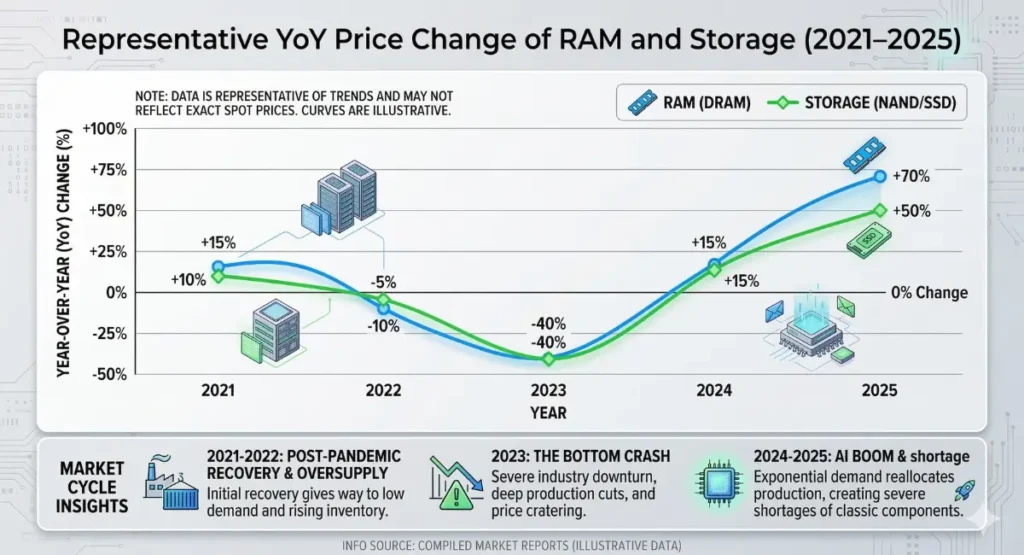
Now add this: DRAM and SSD/NAND prices are being squeezed by AI demand and supply limitations. Multiple industry trackers and analysts are warning of sharp increases across 2026:
- Gartner-linked reporting says memory costs can surge dramatically by end of 2026, making budget PCs harder to sustain.
- TrendForce upgrades its 1Q 2026 outlook to DRAM +90–95% QoQ and NAND +55–60% QoQ in contracts (these swings ripple into consumer devices).
- IDC also warns 2026 DRAM/NAND supply growth will be below historical norms and frames this as a shortage-driven pressure on device markets.
Translation: even if you want to replace your laptop, you may pay more than you expect. That makes repair and smart upgrades the best “anti-inflation” strategy for personal tech.
The Repair-First Mindset (the rule that saves most people money)
Here’s the simplest way to think about it:
If your laptop still turns on and the motherboard isn’t dead, it’s usually worth trying to repair or refresh it first.
Because many “slow laptop” cases are caused by:
- storage nearly full
- overheating and throttling
- too many background apps
- a weak battery
- a failing charger/port
- dust and poor airflow
- outdated drivers/OS
Most of these are fixable without buying a whole new device.
The Upgrade vs Replace Decision Tree (use this every time)
Step 1 — Is it a safety issue?
Stop and service immediately if you see:
- battery swelling (bulging bottom case, trackpad lifting)
- burning smell / excessive heat
- sparks at charging port
- liquid damage with corrosion smell
Swollen lithium batteries are not “wait and see” problems. They’re safety problems.
Step 2 — Does it meet your “must-have” needs?
Ask:
- Can it run the apps you need for school/work?
- Can it run a supported OS with security updates?
- Is performance “fixable,” or is it fundamentally too old for your workflow?
If it’s just slow, jump to the repair/upgrade checklist below.
Step 3 — Compare cost logically
A good rule:
- If repair/upgrade cost is under 30–40% of the replacement cost → usually repair/upgrade.
- If it’s 60%+ and still won’t meet your needs → consider replacing.
This isn’t perfect, but it stops emotional spending.
The 2026 “Make It Feel New” Checklist (in the right order)
1) Fix heat first (because heat makes everything slower)
A lot of “slow” laptops are actually hot laptops.
When a laptop overheats, it throttles—it slows itself down to survive.
Do this:
- clean vents
- don’t use it on beds/blankets
- elevate the back slightly
- get a basic cooling pad if your room is warm
This alone can bring back performance.
2) Do the “software clean slate” (no tech skills required)
- uninstall unused programs
- disable junk startup apps
- check your browser extensions (many are heavy)
- update Windows/macOS + drivers
- keep free space on your system drive
Bonus: if your device feels “haunted,” a clean OS install can help.
3) Replace the parts that actually fail (battery, charger, keyboard)
These are the most common real-life pain points:
- battery can’t last classes/meetings
- charger fails or breaks ports
- keyboard keys stop working
- screen flicker or dead pixels
Fixing these is often cheaper than replacing the full machine—and it’s less wasteful.
“But I heard upgrades are expensive now”
Yes—the global memory/storage crunch is real, and the market is tight.
That’s exactly why it’s smarter to:
- upgrade only what you need
- avoid panic buying new devices
- extend a working laptop’s life by 12–24 months where possible
Even small improvements matter if they prevent a full replacement during a high-price cycle.
Real-life scenarios (and what to do)
Scenario A: “My laptop is slow, but it’s not broken”
Do:
- Clean storage and startup
- Fix overheating
- Update OS and drivers
- Check battery health (weak battery can cause throttling)
If it still lags, consider a targeted upgrade path instead of replacement.
Scenario B: “Battery drops from 100% to 30% fast”
Be concerned if:
- shuts down suddenly
- swells
- gets unusually hot while charging
Replace battery early if it affects your daily use. Don’t wait until it becomes unsafe.
Scenario C: “My laptop is fine but my storage is always full”
In 2026, this problem is getting worse because apps, updates, and files are bigger. If you’re constantly deleting things to survive, it’s time to rethink how you store data (cloud + external + local).
Sustainable tech is also a jobs and local economy issue
Right-to-repair advocates point out a simple chain reaction: when devices are repairable, they last longer, and fewer new products need to be manufactured—reducing resource extraction and waste.
And broader commentary suggests repair and reuse can support local employment and reduce e-waste volumes.
This isn’t just “green talk.” It’s practical economics.
Where SellX fits in this repair-first world (Sri Lanka + global mindset)
If you’re in Sri Lanka (or sourcing through Sri Lankan channels), it helps to have a local tech hub that supports repairs, replacements, accessories, and advice—so people don’t default to buying brand new.
Here are two useful starting points:
- SellX Help & Support for guidance (warranty, delivery, general help).
- SellX Warranty / Exchange / Return Policy if you need to know what to claim and when.
FAQ
1) Is repairing really better for the environment?
Yes, in most cases. E-waste is rising fast (62 million tonnes in 2022) and only 22.3% is formally recycled. Extending device life reduces demand for new manufacturing and reduces waste.
2) Why are laptops and parts getting more expensive in 2026?
Because memory and storage supply is tight and demand from AI/data centers is intense. TrendForce and IDC both point to strong price pressure and limited supply growth in 2026.
3) When should I replace my laptop battery?
Replace when:
- it can’t last your day
- it shuts down unexpectedly
- it becomes hot abnormally
- you see swelling (urgent)
4) When should I claim warranty?
Claim when the issue is a defect under normal use, especially early failures (battery, charger, screen issues) within the warranty period. Always keep invoice and packaging if required—policies differ by seller.
5) Is it better to upgrade or replace in the middle of a global shortage?
Often better to upgrade only what you need and postpone full replacement—especially when memory/storage prices are inflated.
6) What’s the fastest “repair-first” win?
If the laptop is slow: fix heat + clean startup/apps + free space + update OS/drivers. Many devices feel dramatically better without any hardware change.